FEA Solver Launcher
 Cadfil Help contents
  Cadfil.com Home
Introduction
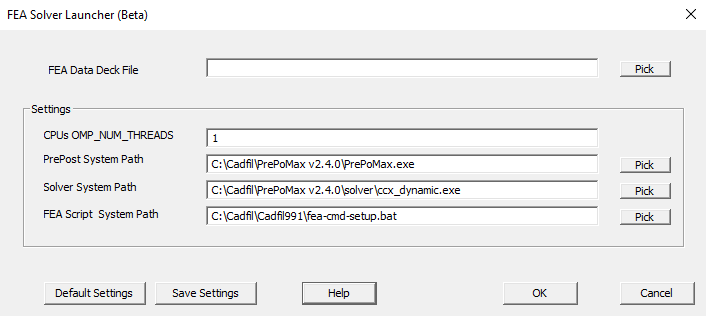
This is a tool was designed to run the Calculix FEA solver (and the PrePoMax post processor) using an input FEA data-deck created by the Cadfil FEA interfaces tool. It could also be configured to use other solver software if required. Using this launcher saves the user having to change system setting to set up the Calculix and PrePoMax installations and shortcuts some other tasks. After it is configured (discussed in a following section) the user picks an FEA data deck file using the Pick button, you then click the OK button. Cadfil then runs the script (.bat) file that has been configured and passes the following parameters based on what has been configured.
- The data deck path (working folder)
- The data deck file name
- The Number of CPUs to use (OMP_NUM_THREADS)
- The installation folder for the FEA postprocessor software.
- The FEA postprocessor software executable file name
- The installation folder for the FEA solver software
- The FEA solver software executable file name
For reference the default .bat script supplied with the Cadfil installation does the following:
- Creates a command (CMD) window
- Changes the CMD window working folder to the data deck folder
- Adds the solver and PrePost installation folders to the local CMD window system path
- Sets the environment variable in the CMD window for OMP_NUM_THREADS=n
- Runs the solver using the supplied data deck as input
- If the solver appears to have run OK it prompts to run the FEA postprocessor software using the solver output as input
About Calculix and PrePoMax
Calculix is an free FEA system. PrePoMax is a free graphical FEA pre and post processor software system that works with Calculix. Both systems are available under The GNU General Public License V3, for more information please see:
The Cadfil has absolutely no responsibility or warranty relating to the use of these software products.
Configuration/Setup
The easiest way to setup Calculix/PrePoMAx to go to https://prepomax.fs.um.si/downloads/ and download the latest package. This is zip file which if you download and unpack to the c:\cadfil folder the default settings in the FEA launcher should be good. If the version is different you will need to repick the Solver and pre-post exe files and then click the Save Settings button. The settings are saved to the registry for the current user and will be loaded when the launcher is next opened.