Snail Band Pattern
 Cadfil Help contents
  Cadfil.com Home
Overview and usage
This topic is a subtopic of then Band pattern selection topic.
The curiously named snail pattern can be found in some online literature. The name derives from the fact that if it is used for multiple layer repeats then the layer thickness spirals outwards like a snails shell. The primary use for this pattern type is for pipe winding when the band width is very large in relation to the pipe diameter and the number of circuits to make a layer is not close to a whole number. Consider the example when for a given band, mandrel diameter and wind angle the calculation says 2.5 circuits would make a complete layer. The standard band algorithm involves rounding the circuits to a whole number. In this example if 2 circuits is used (round down) then there will be two large gaps. If we round up to three bands these are evenly spaced so we have threes areas of significant overlap. It maybe that both cases are not desirable. One solution would be to change the wind angle to get close to a whole number of bands (see the useful calculations topic), this option my be undesirable for the part design.
The snail pattern option uses dwell winding, rounds the number of band up to the next whole numbers and sets a leading band pattern of one. The resulting overlap comes at the end with the last band overlapping the first. Thus the overlap comes in one rather than multiple places. if the layer is repeated the second layer starts where the first layer finishes. Thus if you for example did five layers there is still only one area of overlap that becomes increasingly less significant. If the number of bands to make one layer was 8.25 then if you have 1 layers there would be 0.75 (75%) of a band overlap with 9 circuits however if you had 4 layers then you would get 8.25*4=33 circuits and exactly 4 layers with no extra overlap.
In options such as MultiPipe where automatic pattern selection can be used, snail pattern is a option that can be selected. It can also be manually selected by the snail button on the band pattern selection dialog described in the parent topic that is linked above
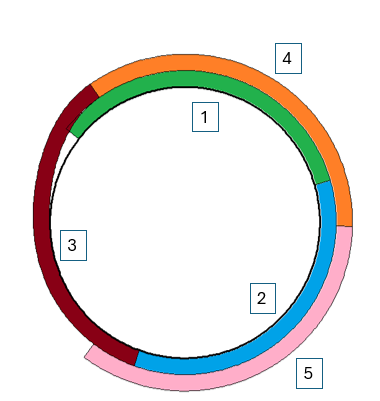
In the diagram below about 2.9 bands are needed to make a layer, this is rounded up to 3 so that bands 1 to 3 make the first layer (with and overlap) and bands 4 and 5 are part of a second layer. As can be seen the layer is spiral in form.
Note that with the snail pattern selection you get shown the amount of dwell (in the text window) and how that is split between the would end zones. You get the option to have an additional 360 degrees of dwell split in the same manner between the ends